English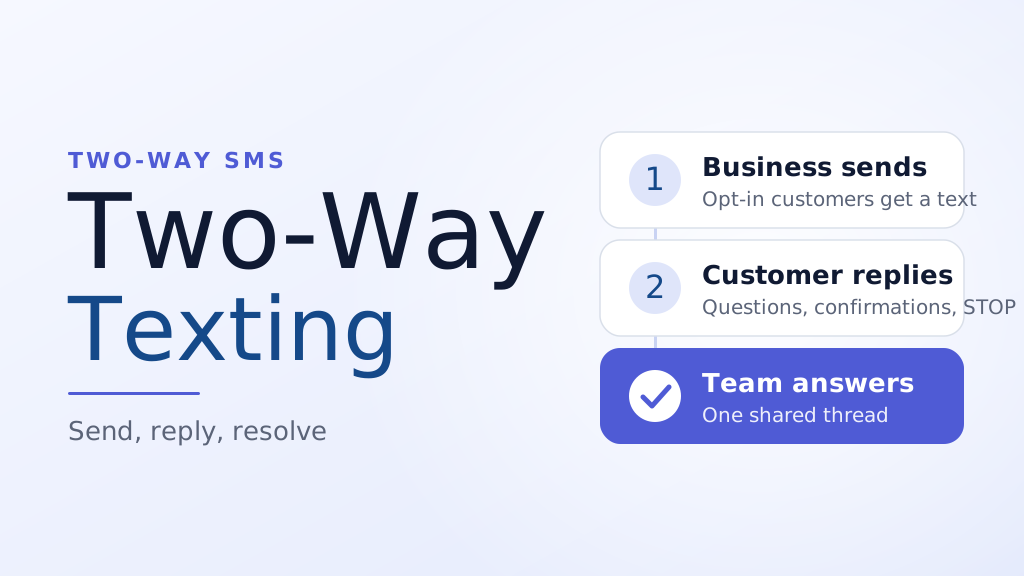
Introduction
A salon sends a reminder: "Your appointment is tomorrow at 2 PM. Reply C to confirm." A customer replies, "Can we move it to 4?" The message lands in a number nobody checks. The customer waits, gives up and books somewhere else.
That gap is the difference between one-way and two-way texting. One-way messages talk at customers. Two-way texting lets them answer, and lets your team answer back in the same thread.
This guide explains what two-way texting is, how it works behind the scenes, where it pays off, the rules you must follow and how to set it up step by step.
Key Takeaways
- Two-way texting means customers can reply to your business texts and your team can respond in the same conversation.
- It works when your number can receive messages and the replies reach a shared inbox or your own software.
- Strong uses include appointment changes, order questions, support, feedback and lead follow-up.
- Opt-out replies must be honored. In the US, the FCC lists STOP, QUIT, END, REVOKE, OPT OUT, CANCEL and UNSUBSCRIBE as valid revocation words.
- A shared inbox with assignment and notes keeps replies from getting lost or answered twice.
What Is Two-Way Texting?
Two-way texting, also called two-way SMS, is business texting where the conversation can go both directions. You send a message to a customer, the customer replies from their own phone, and the reply reaches you.
It looks like a normal text thread on the customer's side. On your side, replies usually appear in a shared inbox or are passed to your software, so a person or a system can read them and respond.
Two-way texting is not the same as mass texting. You can send a campaign to thousands of opted-in contacts, but the moment one of them replies, the exchange becomes a one-to-one conversation.
One-Way vs Two-Way Texting
Both have a place. The right choice depends on whether you need an answer.
| One-way texting | Two-way texting | |
|---|---|---|
| Direction | Business to customer only | Business and customer, both ways |
| Typical messages | Alerts, receipts, announcements | Reminders with replies, support, scheduling, feedback |
| Replies | Not read, or blocked | Read and answered |
| Customer feel | Broadcast | Conversation |
| Staff effort | Low once set up | Needs someone watching the inbox |
| Opt-out handling | Still required | Still required, and arrives as a reply |
If a message ends with "Reply to confirm" or "Questions? Text us," it is already a two-way message. The reply needs somewhere to go.
How Two-Way Texting Works
Behind a simple text thread there are three moving parts.
A number that can receive replies. The number you text from is also the number customers reply to. Business texting commonly uses a local 10-digit number, a toll-free number or a short code. Registration rules differ by type, and our 10DLC registration guide covers the local number route.
A way for replies to reach you. A reply is an inbound message. A platform can show it in a team inbox, or push it to your own system through a callback. SMSLocal's SMS API page, for example, says replies arrive on the same callback as delivery reports and are marked as mobile originated, so developers can tell outbound and inbound messages apart.
Someone or something to answer. A person reads the reply and responds, or software handles a simple one automatically, such as a "C" to confirm an appointment. Anything unusual goes to a person.
Each reply is still a normal text message, so long messages are split into segments and each segment is billed on its own.
Two-Way Texting Use Cases
Two-way texting earns its keep wherever a customer might answer.
- Appointment changes. Customers confirm, cancel or ask to move a slot by replying. Fewer phone calls, fewer empty chairs.
- Customer support. A shopper asks about a delivery or a return and gets an answer without a hold queue.
- Order and booking questions. A restaurant, repair shop or hotel can clear up details before they become complaints.
- Lead follow-up. A real estate agent or car dealer can reply to a web form inquiry by text while the interest is fresh.
- Feedback and reviews. A short "How was your visit? Reply 1 to 5" gets more honest answers than a long form.
- Campaign replies. A promotion that invites a reply, such as "Reply YES for the early slot," turns a broadcast into a conversation.
For purely informational texts such as shipping and security alerts, see our guide to transactional SMS. Customers may still reply to those, so the inbox should be ready for it.
Make your messages stand out with reliable, fast and effective communication. Elevate your texting game today.
What to Look for in a Two-Way Texting Setup
Sending is the easy part. What matters is how well your team can handle the replies. Check for these features.
- A shared inbox. Everyone sees the same threads, so a customer is never answered twice or not at all.
- Assignment. A reply can be given to a named person or team.
- Internal notes. Teammates can leave private context that the customer never sees.
- Collision detection. Two people cannot answer the same customer at once.
- Saved replies. Canned answers for questions you get every day.
- Routing rules. Messages about billing go to one team and urgent ones escalate when no one responds.
- Multi-channel threads. If customers also reach you on WhatsApp or email, one place to read all of it saves time.
SMSLocal's omnichannel inbox page describes these features: a single team inbox for SMS, WhatsApp, email, voice and social channels, assignment and @mentions, private notes, collision detection and routing rules with timers. Teammates are added as seats.
Two-Way Texting Rules You Must Follow
Two-way texting makes opt-outs easier for customers, so compliance has to be part of the design. These are the key points for the United States. This is general information, not legal advice.
Get consent first. Text only people who agreed to hear from you, and keep a record of when and how they agreed. The CTIA Messaging Principles and Best Practices ask senders to document consent with details such as the time and the way it was collected.
Honor opt-outs in any reasonable form. Under the FCC's rule at 47 CFR 64.1200, a customer can revoke consent by any reasonable method. Replies with the words stop, quit, end, revoke, opt out, cancel or unsubscribe count as valid per se. If a customer words it differently, such as "please take me off your list," you must treat it as a revocation when a reasonable person would understand it that way.
Do not limit how people can opt out. The rule says senders may not designate an exclusive means to request revocation. A STOP reply must work, and other routes such as a phone call or a web form should too.
Act within the deadline. Revocation requests must be honored within a reasonable time that does not exceed ten business days. In practice, stop messaging right away.
Send at most one confirmation. After an opt-out, you may send a single text that confirms it, as long as it has no marketing content. Sent within five minutes, it is presumed to fall within the customer's earlier consent. Send nothing else afterward. CTIA's guidance matches this: one final confirmation per campaign, then no further messages.
Say how to opt out. CTIA advises stating in the message how and with which words a customer can opt out, using standard STOP wording. Its opt-in confirmation guidance also calls for customer care details, such as HELP instructions.
Register your sender. US carriers expect businesses to register their messaging programs. The brand and campaign steps are covered in the guide linked earlier in this article.
If a texting setup does not allow replies at all, the FCC rule requires a clear disclosure on each message that two-way texting is not available, plus other ways to opt out. That is one more reason to choose a setup where replies work.
How to Set Up Two-Way Texting: Step by Step
Step 1: Pick the use case
Start with one job, such as appointment confirmations or order questions. A narrow start is easier to staff and measure.
Step 2: Choose a number and register it
Decide which number customers will text. If it is a local number, complete registration before you send so your messages are not filtered.
Step 3: Collect clear consent
Add a sign-up form, checkbox or keyword that names your business, says what kinds of messages to expect and explains how to opt out.
Step 4: Decide who answers
Name the people or team who handle replies and set the hours they are available. A reply that sits for two days is worse than no option to reply.
Step 5: Write your reply templates
Draft short answers for the ten questions you hear most. Keep them friendly and specific, and leave room to personalize.
Step 6: Set up opt-out handling
Make sure STOP and the other keywords are read and acted on, and that your contact list is updated right away. Ask your provider how this works on its platform before launch.
Step 7: Test and start small
Send test messages to your own team, reply from different phones and try an opt-out. Then launch to a small group and look at response times.
Two-Way Texting Best Practices
- Answer fast. Replies are expected to feel like a conversation. If you cannot reply quickly, say when you will.
- Use an auto-reply outside business hours. A line such as "We received your message and will reply tomorrow morning" sets expectations. Our guide to automated text messages shows when automation helps and when it irritates.
- Sound like a person. Use the customer's name, avoid jargon and keep each reply to one idea.
- Keep sensitive details out of texts. Do not ask customers to text card numbers, passwords or government IDs.
- Hand off cleanly. When a chat needs a call or an email, say so and note it in the thread.
- Review the inbox weekly. Look for repeated questions that should become a saved reply or a line in your FAQ.
Common Two-Way Texting Mistakes
- Sending "Reply to confirm" with no one reading replies.
- Ignoring opt-out wording. Customers do not always type STOP in capitals.
- Using a number that cannot receive replies.
- Letting two people answer the same customer.
- Pitching before answering. If a customer asks a question, answer it first.
- Not recording consent.
Two-Way Texting With SMSLocal
SMSLocal combines the sending side and the reply side. Developers can receive replies on the same callback as delivery reports, and teams can read and answer them in a shared inbox. If you want to see how it would fit your business, talk to the SMSLocal team about your use case, volume and compliance needs.
Conclusion
Two-way texting turns a text from an announcement into a conversation. It cuts phone tag, rescues appointments and gives customers a simple way to reach you.
Start with one use case, make sure someone owns the inbox and build your opt-out handling in from the first day. Do that and two-way texting becomes one of the most useful channels you have.
Start your free trial with SMSLocal and manage replies in one shared inbox.
Frequently Asked Questions
Two-way texting is business texting where customers can reply and your team can answer in the same thread. It works like a normal text conversation, but replies usually reach a shared inbox or software instead of one person's phone.
Yes. Two way SMS and two way texting mean the same thing: business messaging that supports replies. SMS is the underlying text message technology.
Yes. You should text only people who agreed to receive messages from your business, and you should keep a record of how and when they agreed. Consent also covers only the program the customer agreed to, so a customer who texts you a question has not agreed to promotions.
Treat STOP, QUIT, END, REVOKE, OPT OUT, CANCEL and UNSUBSCRIBE as opt-outs, plus any clear request to stop. Update your list immediately, and send at most one confirmation text with no marketing in it.
Sometimes, but it depends on the number type and your provider. Landlines and some voice-only numbers may not be able to receive text messages. Ask your provider whether your number can be enabled and whether it needs registration.
Pricing depends on your provider and plan. Messages are usually billed per segment, and some platforms charge for inbox seats as well. Check your provider's current pricing before you commit.