 English
소개
한 치과 진료소에서 노쇼(No-Show)를 줄이고자 프런트 데스크에서는 개인 전화로 환자에게 문자 메시지를 보내기 시작했습니다. "안녕하세요 샘, 근관 검사는 내일 9시에 있습니다." 환자의 전화가 수술에 대해 몰랐던 가족과 공유되기 전까지는 작동합니다.
HIPAA 준수 문자 메시지가 가능합니다. 그러나 여기에는 규칙이 있으며 위의 클리닉에서는 이미 규칙을 확장했습니다.
이 가이드에서는 일반 영어로 HIPAA 준수 문자 메시지를 설명합니다. 규칙에 명시된 내용, 어떤 메시지가 더 안전한지, 문자 메시지 공급업체에 문의할 사항 및 간단한 프로세스를 설정하는 방법을 다룹니다. 이는 법적 조언이 아닌 일반적인 정보입니다. 우리는 2026년 11월 45 CFR Part 164의 규칙 텍스트를 확인했습니다.
주요 시사점
- HIPAA는 환자에게 문자 메시지를 보내는 것을 금지하지 않습니다. 보호받는 건강 정보에 대한 합리적인 보호 장치가 필요합니다.
- HIPAA 준수 문자 메시지는 "SMS"라는 단어에만 의존하는 것이 아니라 문자 메시지를 보내는 방법, 포함하는 내용, 메시지를 처리하는 사람에 따라 달라집니다.
- 최소한의 것을 공유하십시오. 알림에는 진단이나 치료 이름이 필요한 경우가 거의 없습니다.
- 공급업체가 귀하를 대신하여 환자 정보를 처리하는 경우 해당 공급업체와의 사업 제휴 계약이 필요합니다.
- 의료 문자 메시지는 짧고 일정이 잡혀 있으며 임상 세부사항이 없을 때 가장 잘 작동합니다.
- 마케팅 및 알림 텍스트도 TCPA와 같은 다른 법률의 적용을 받습니다.
- 어떤 도구도 자체적으로 규정을 준수할 수 없습니다. 귀하의 프로세스는 소프트웨어만큼 중요합니다.
문자 메시지는 HIPAA를 준수합니까?
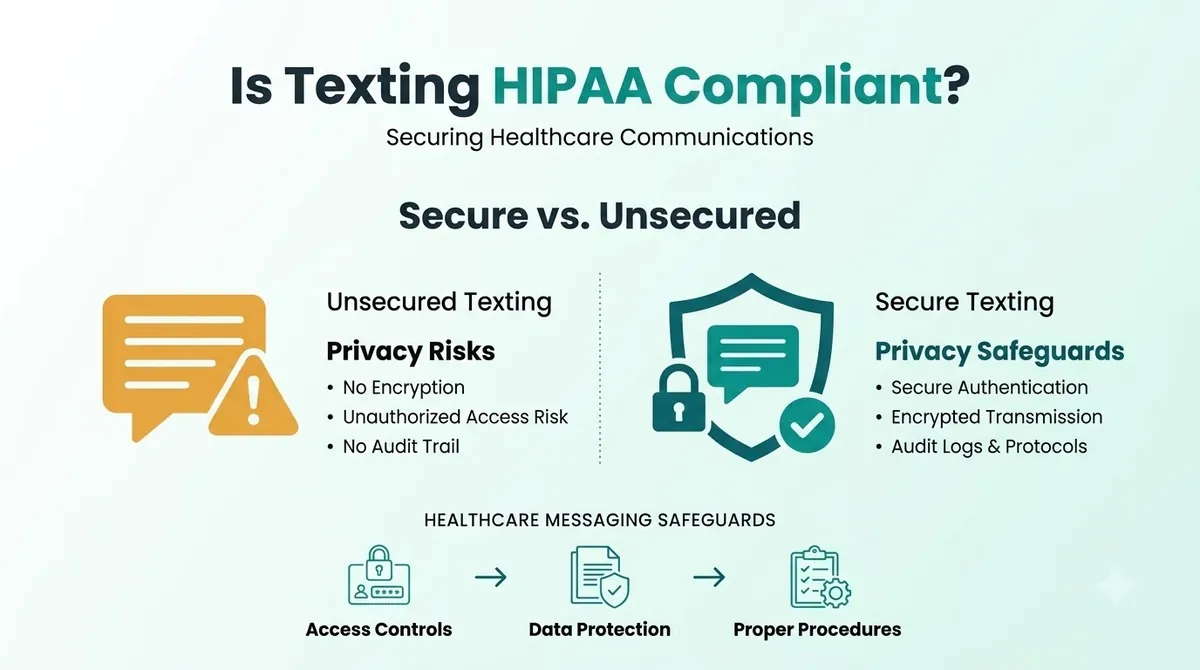
HIPAA에 맞는 방식으로 문자 메시지를 보낼 수 있지만 일반 문자 메시지는 자동으로 준수되지 않습니다. HIPAA는 의사, 진료소, 치과 의사, 건강 보험 등 해당 기관과 이들에서 일하는 사업 동료를 위한 일련의 규칙입니다. 메시지 유형에 붙일 수 있는 스탬프가 아닙니다.
표준 SMS는 암호화된 채널로 구축되지 않았으므로 HIPAA 준수 SMS는 사용 방법에 따라 달라집니다. SMS 암호화는 일반 문자 메시지가 기본적으로 제공하는 기능이 아닙니다. 메시지는 이동통신사 네트워크를 통해 전달되고 휴대전화에 남아 있으며 잠금 화면에 표시될 수 있습니다. 이는 문자 내용과 전화를 볼 수 있는 사람이 주요 위험이 됩니다.
PHI(보호된 건강 정보)는 개인과 연결될 수 있는 건강 정보입니다. 이름과 약속 유형이 일반적인 예입니다. PHI에 문자 메시지를 보내는 것은 위험에 맞는 보호 장치가 필요하다는 것을 의미합니다.
HIPAA 문자 메시지 규칙 개요
| 주제 | 그것이 당신에게 요구하는 것 | 어디에서 오는가 |
|---|---|---|
| 전송 보안 | 네트워크를 통해 전송된 PHI에 대한 무단 접근을 방지하기 위한 기술적 조치 | 45 CFR 164.312(e) |
| 암호화 | 적절하다고 판단될 때마다 전자 PHI를 암호화합니다(주소 지정 가능 항목). | 45 CFR 164.312(e)(2)(ii) |
| 필요한 최소한의 | PHI를 목적에 필요한 정도로 제한하세요. | 45 CFR 164.502(b) |
| 사업 동료 | PHI를 처리하는 공급업체로부터 만족스러운 보증을 받으십시오. | 45 CFR 164.502(e) 및 164.308(b) |
| 접근 통제 | PHI에 접근하는 사람을 확인하고 접근을 제한하세요. | 45 CFR 164.312(a) 및 (d) |
"주소 지정 가능"은 선택 사항을 의미하지 않습니다. 이는 위험을 평가하고 측정값을 적용하거나 다른 것이 왜 좋은지 문서화한다는 의미입니다.
HIPAA 문자 메시지 환자: 일반적으로 괜찮은 것과 위험한 것은 무엇입니까?
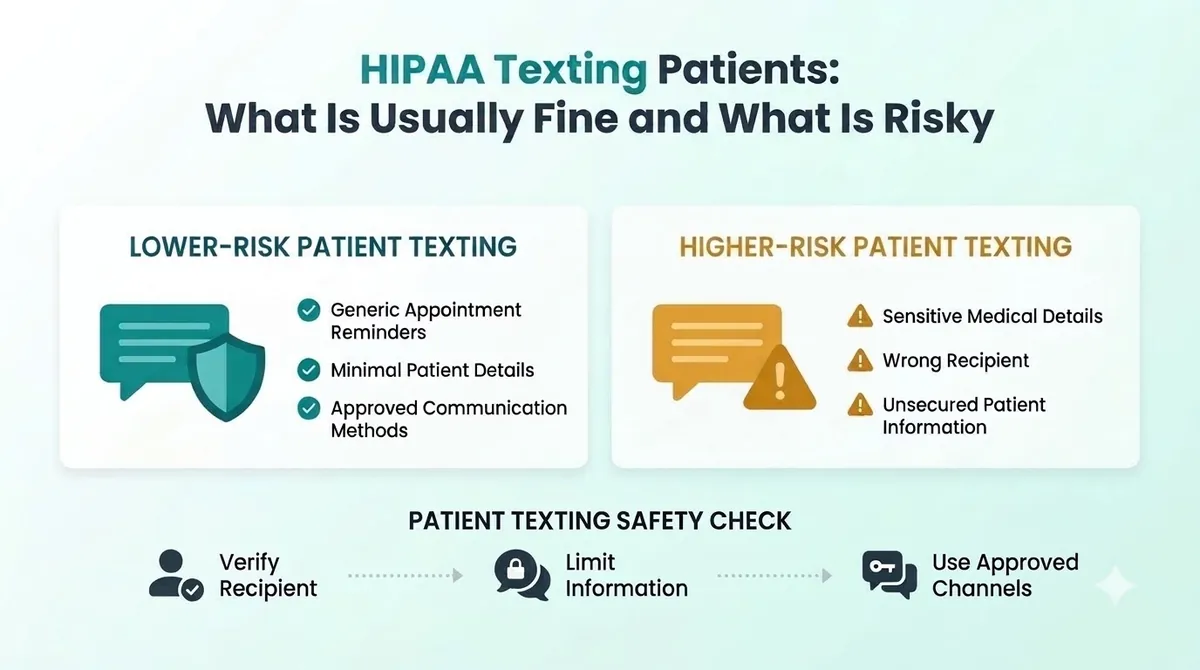
가장 안전한 텍스트는 거의 말하지 않습니다. 그들은 자세한 내용을 확인하기 위해 환자에게 안전한 장소를 알려줍니다.
위험도가 낮은 예(최소 정보):
“안녕하세요, Sam, 내일 오전 9시에 Bright Smile Dental 진료 예약을 알려드립니다. C로 답장하여 확인하거나 카드에 기재된 전화번호로 전화해 주세요.”
“문서가 준비되었습니다. 이를 보려면 환자 포털에 로그인하십시오.”
위험도가 높은 예(정보가 너무 많음):
“안녕하세요 샘, 근관 추적 검사는 내일 9시에 있습니다. 테스트 결과 감염이 나타났습니다.”
“귀하의 [상태] 진단을 위해 귀하의 [약명] 처방전이 준비되었습니다.”
첫 번째 쌍은 최소값을 제공합니다. 두 번째 쌍은 휴대폰을 들고 있는 사람이라면 누구나 볼 수 있는 텍스트에 임상 세부 정보를 입력합니다. 이것이 바로 우리가 진단, 테스트 결과 또는 약물 치료를 포함하지 않는 HIPAA 문자 메시지 예시를 제안하는 이유입니다.
의료 문자 메시지: 팀이 보내는 문자 메시지
일반적인 용도로는 약속 알림, 예약 확인, "늦어지고 있습니다" 메모, 결제 링크, 리콜 알림, 만족도 설문조사 등이 있습니다. 약속 알림이 가장 일반적입니다. 자동 약속 알림은 프런트 데스크의 전화 통화 시간을 절약해 주며, 약속 알림 문자 메시지 shows how to keep them short and clear.
Texting clinical detail, such as results or treatment plans, needs much more care. In most cases, a secure portal or phone call is the better channel.
What to Ask a HIPAA Compliant Texting App or Vendor
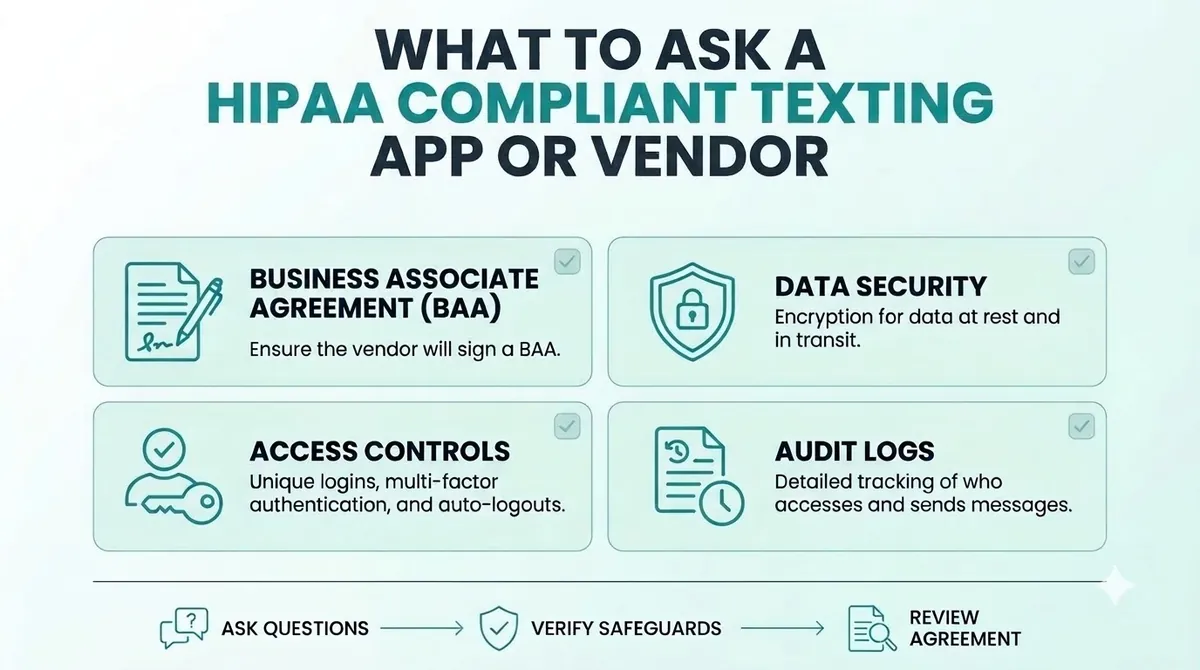
If a texting service will handle PHI for you, the vendor is acting as a business associate. HIPAA says a covered entity may let a business associate create, receive, maintain or transmit PHI only if it obtains satisfactory assurances that the information will be safeguarded. The usual way to do this is a business associate agreement, often called a BAA. For business associate agreement texting, that means getting it signed before any patient messages go out.
Before you choose a HIPAA compliant texting app, appointment reminder software or any other texting service, ask:
- Will you sign a business associate agreement with us?
- How do you protect messages and data while they are sent and stored?
- Who at your company can see our message content?
- How do you handle logins, passcodes and user access?
- Can we remove staff access quickly when someone leaves?
- How long are messages kept, and how are they deleted?
- What happens if there is a security incident?
Get the answers in writing. If a vendor will not sign a BAA, do not send PHI through them. This applies to every vendor, including us. Ask any provider directly before you send patient information.
HIPAA Compliant Texting for Healthcare: A Simple Checklist
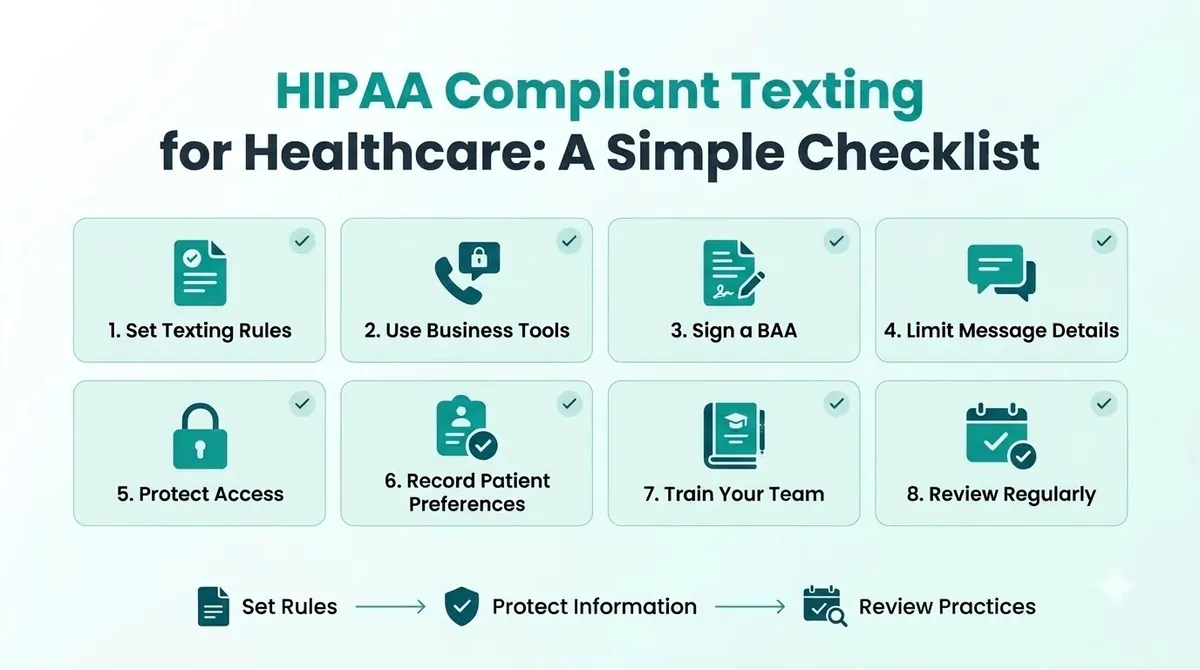
These HIPAA texting best practices are a starting point, not a full compliance program.
1. Decide What You Will and Will Not Text
Write a short list. For example: reminders, confirmations and portal links are fine. Diagnoses, test results and medication names are not.
2. Use Business Tools, Not Personal Phones
Personal phones are hard to control. If an employee leaves or loses their phone, you lose track of patient messages. Use a business tool where you can manage access.
3. Sign a Business Associate Agreement
Do this before you send anything with PHI. Keep a copy.
4. Limit What Each Text Includes
Think "minimum necessary". Use a first name, the clinic name, the time and a way to reply or call. Leave out the reason for the visit.
5. Protect Access
Use unique logins, screen locks and passcodes. Make sure former staff lose access the same day.
6. Get and Record Patient Preferences
Ask patients whether they want texts and which number to use. Record their answer. Our guide to SMS opt in explains how to ask clearly and keep proof.
7. Train Your Team
Everyone who texts patients should know the rules. A one-page guide with safe and unsafe examples is enough to start.
8. Review Regularly
Check your process twice a year, and again when you change tools or add new types of messages.
Common HIPAA Texting Mistakes
- Using personal phones for patient texts. You cannot control or audit them.
- Putting too much detail in the message. Diagnoses and results do not belong in a reminder.
- No agreement with the vendor. If they handle PHI, you need a BAA.
- Texting a wrong or shared number. Confirm numbers and ask patients which number to use.
- Treating HIPAA as the only law. Texts that promote services also fall under TCPA rules.
- Skipping training. One careless text can undo a good process.
HIPAA and the TCPA: Two Different Laws
HIPAA protects health information. SMS marketing compliance is a separate job. The TCPA controls marketing calls and texts, and it asks for consent, honors opt-outs and sets sending hours. A text can follow one and break the other. Some health care messages are treated differently under the TCPA, and our TCPA compliance guide explains how to tell the difference. When you are unsure, get written advice from a lawyer.
HIPAA Compliant Texting Using SMSLocal
SMSLocal is a messaging platform for business texting. We do not claim that using any platform makes you HIPAA compliant. If your messages will include PHI, ask us whether a business associate agreement is available for your account before you send anything, and get the answer in writing. For simple reminders that carry no clinical detail, keeping messages minimal reduces your risk. You can speak to the SMSLocal team about how replies, opt-outs and access work for your account.
Make your messages stand out with reliable, fast and effective communication. Elevate your texting game today.
결론
HIPAA compliant texting comes down to a few habits. Say less in each message, use business tools, get a business associate agreement when a vendor handles PHI, protect access and train your team.
You do not need to stop texting patients. You need a process you can explain and a vendor who will put their promises in writing.
SMSLocal로 무료 평가판을 시작하고 등록된 신뢰할 수 있는 메시지를 보내세요.
자주 묻는 질문
합리적인 보호 장치를 사용한다면 그럴 수도 있습니다. HIPAA는 환자에게 문자 메시지를 보내는 것을 금지하지 않지만 표준 SMS는 암호화된 채널로 설계되지 않았습니다. 메시지를 최소화하고 제어할 수 있는 도구를 사용하세요.
이는 보호되는 건강 정보에 대한 HIPAA의 보호 조치를 따르는 문자 메시지입니다. 이는 최소한의 공유, 액세스 제어, 전송 중인 메시지 보호 및 정보를 처리하는 공급업체와 계약을 맺는 것을 의미합니다.
서비스가 귀하를 위해 PHI를 생성, 수신, 유지 또는 전송하는 경우 그렇습니다. HIPAA는 비즈니스 제휴자의 만족스러운 보증을 요구하며 이를 얻기 위한 일반적인 방법은 비즈니스 제휴 계약입니다.
많은 관행이 그렇습니다. 텍스트는 짧게 유지하십시오: 이름, 진료소 이름, 날짜 및 시간, 응답 또는 전화 방법. 방문 이유와 임상적 세부사항을 기재하지 마세요.
진단, 검사 결과, 약물 이름 및 치료 세부 사항을 피하십시오. 환자를 보안 포털로 보내거나 대신 전화하도록 요청하십시오.
일부 앱은 의료용으로 제작되었지만 자체적으로 규정을 준수하도록 해주는 앱은 없습니다. 공급업체에 서명된 비즈니스 제휴 계약을 요청하고 액세스 및 메시지 저장이 어떻게 처리되는지 확인하세요.