English
вступ
Привіт, ви втомилися надсилати текстові повідомлення одне за іншим усім своїм друзям і родині? Ви керуєте бізнесом і хочете мати простий спосіб обмінюватися повідомленнями з усіма клієнтами одночасно? Ви потрапили в потрібне місце. У цій статті ми покажемо вам, як це зробити надсилати масові текстові повідомлення безкоштовно з комп’ютера лише за три прості кроки. Більше не доведеться зношувати свої великі пальці або платити за дорогі послуги надсилання текстових повідомлень. Ви надішлете повідомлення сотням людей одночасно. Тож беріть комп’ютер і телефон і почнемо. До кінця цього посібника ви станете масою обмін текстовими повідомленнями професіонал
Представляємо безкоштовні масові текстові повідомлення
Ламаючи бар’єри традицій обмін текстовими повідомленнями, безкоштовні масові текстові повідомлення революціонізували спосіб нашого спілкування. Завдяки економічно ефективним рішенням користувачі можуть зараз надсилати необмежену кількість текстових повідомлень без стягнення додаткових витрат. Це нововведення відкрило нові можливості як для окремих осіб, так і для компаній для більш ефективного та доступного зв’язку зі своєю цільовою аудиторією.
Навіщо надсилати масові повідомлення з комп’ютера?
Масова розсилка текстових повідомлень з вашого комп’ютера є ефективним і ефективним. Замість того, щоб набирати повідомлення десяткам або навіть сотням контактів на крихітній клавіатурі свого телефону, ви можете створити одне повідомлення на повнорозмірній клавіатурі комп’ютера та надіслати його всьому списку контактів одночасно.
Серед основних переваг використання комп’ютера для data-wpil-monitor-id=”478″>надсилання масових повідомлень:
• Економте час. На фізичній клавіатурі друкувати набагато швидше. Створення повідомлення для великої групи на телефоні може тривати багато років. За допомогою комп’ютера можна створити чернетку повідомлення один раз і миттєво надіслати його багатьом одержувачам.
• Охопіть більше людей. Більшість телефонів мають обмеження на кількість одержувачів, яких можна включити в одне повідомлення. Ваш комп’ютер скасовує це обмеження, тож ви можете надсилати текстові повідомлення скільки завгодно людям одночасно.
• Доріжка відкривається та клацає. Деякі служби масового надсилання текстових повідомлень надають аналітику, яка дає вам змогу побачити, хто відкрив ваше повідомлення та які посилання були натиснуті. Такі дані можуть допомогти вам створювати ще ефективніші повідомлення в майбутньому.
• Розклад повідомлень. Якщо ви хочете відправити повідомлення в певний час, вам знадобиться скористатися службою масових текстових повідомлень на вашому комп’ютері. Більшість дозволяє планувати текстові повідомлення на дні, тижні або навіть місяці наперед. Тільки ваш телефон не пропонує цю функцію.
• Зберегти чернетки. Чернетки повідомлень легко зберігати на комп’ютері, щоб ви могли внести зміни та надіслати текст, коли будете готові. Зберігати чернетки на телефоні може бути складніше, і вони потенційно можуть бути втрачені, якщо ви придбаєте новий телефон.
За допомогою комп’ютера надсилати масове повідомлення повідомлення робить контакти з групами ефективнішими, а також забезпечує переваги, які ви не можете отримати, надсилаючи текстові повідомлення лише з мобільного телефону. Спробуйте – ви здивуєтеся, чому не почали раніше!
Крок 1. Виберіть службу безкоштовних текстових повідомлень
Щоб безкоштовно надсилати масові текстові повідомлення, вам знадобиться скористатися веб-службою SMS. Ось основи, щоб почати:
Крок 1. Виберіть службу безкоштовних текстових повідомлень
Є кілька хороших варіантів безкоштовних послуг SMS-повідомлень. Ми рекомендуємо такі надійні служби, як Smslocal, Plivo або Nexmo. Ці служби надають API для надсилання SMS-повідомлень із вашого комп’ютера.
Після реєстрації облікового запису ви отримаєте доступ до API обміну SMS-повідомленнями і номер телефону (або кілька номерів), який використовуватиметься як ідентифікатор відправника для ваших текстових повідомлень. Повідомлення безкоштовні для невеликих обсягів, тому ви можете почати, не заплативши ні копійки.
Щоб розпочати, увійдіть у свій обліковий запис і знайдіть документацію API. Документи допоможуть вам надіслати SMS-повідомлення за допомогою запиту API з вашої власної програми або веб-сайту. Ви передаєте такі параметри, як номер відправника (номер, з якого одержувачі бачитимуть повідомлення), номер одержувача та вміст вашого повідомлення.
Працювати з API досить просто, але якщо ви застрягнете, ці служби також надають зразки коду на таких мовах, як PHP, Python, Ruby та Node.js, щоб допомогти налагодити обмін SMS-повідомленнями.
Хоча ці служби надають безкоштовні SMS-повідомлення для невеликих обсягів, якщо вам потрібно надіслати великий обсяг текстових повідомлень, вам потрібно буде заплатити за план передплати. Ціни варіюються, але часто починаються від 30 до 50 доларів на місяць за кілька тисяч повідомлень.
Для більшості людей, які тільки починають, безкоштовні варіанти повинні працювати чудово. Спробуйте одну з цих служб SMS, і ви миттєво надсилатимете масу текстових повідомлень!
Крок 2. Завантажте свій список контактів
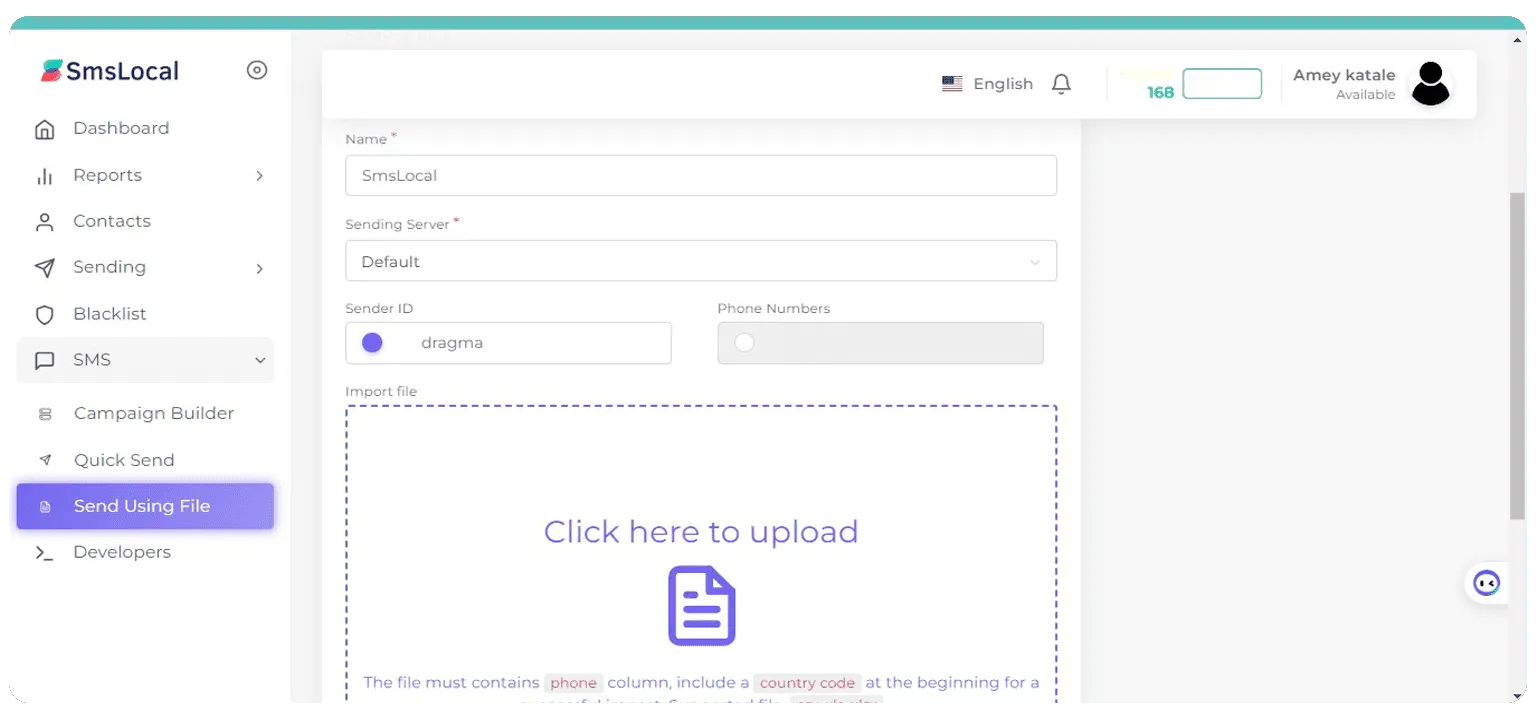
Щоб безкоштовно надсилати масові текстові повідомлення, спершу потрібно завантажити список контактів. Це список телефонних номерів, на які ви хочете надсилати повідомлення. Є кілька способів завантажити свої контакти:
Завантажте файл CSV або Excel
Найпростіший спосіб — експортувати контакти з телефону, служби електронної пошти (наприклад, Gmail) або іншої програми у файл CSV або Excel. Потім у вибраній вами службі текстових повідомлень виберіть опцію завантаження файлу та виберіть файл CSV або Excel. Ваші контакти та їхні номери телефонів буде імпортовано автоматично.
- Переконайтеся, що файл містить лише імена контактів і номери мобільних телефонів.
- Ще раз перевірте, чи всі номери мають правильний формат, наприклад (123) 456-7890.
- Видаліть будь-які дублікати, щоб уникнути надсилання кількох повідомлень одній особі.
Синхронізація з телефону або електронної пошти
Деякі служби дозволяють синхронізувати безпосередньо з телефоном або контактами електронної пошти. Підключіть свій обліковий запис і виберіть опцію синхронізації контактів. ваш контакти за телефоном або електронною поштою потім буде імпортовано в платформу обміну текстовими повідомленнями.
- Це виключає етап експорту у файл, але ви все одно хочете ще раз перевірити наявність дублікатів або будь-яких контактів без номерів телефонів.
- Не всі служби пропонують синхронізацію контактів, тому зверніться до конкретного вибраного інструменту.
Після завантаження контактів перегляньте список, щоб переконатися, що всю інформацію імпортовано правильно. Шукайте будь-які помилки в номерах телефонів або відсутню інформацію, перш ніж переходити до наступного кроку створення та планування текстового повідомлення. Маючи свої контакти на місці, ви готові створити своє повідомлення та надіслати його всім у своєму списку лише кількома клацаннями миші!
Крок 3. Створіть і надішліть масове текстове повідомлення
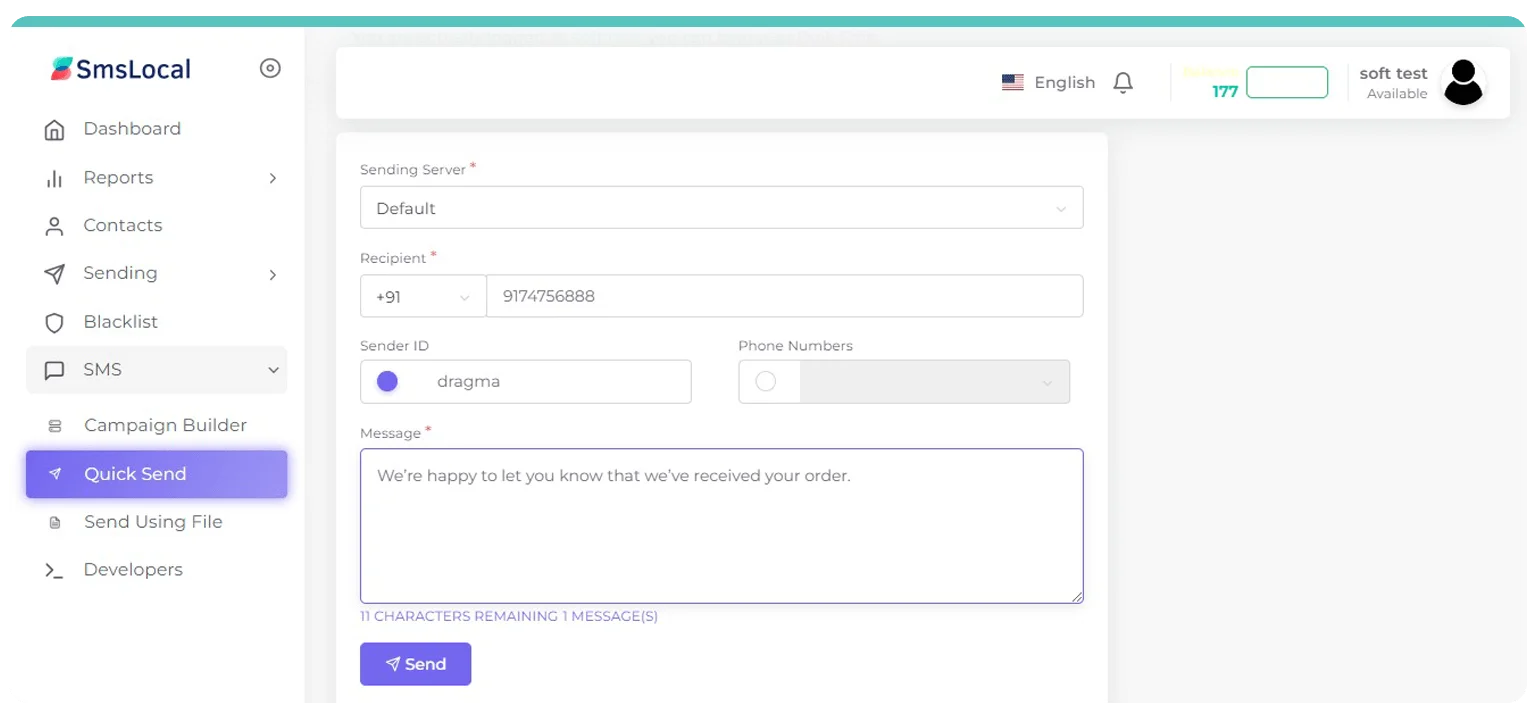
Тепер, коли у вас є чернетка масового текстового повідомлення та список одержувачів, настав час надіслати повідомлення. Цей останній крок виконується швидко та легко.
Compose and Send Your Mass Text Message
Log in to your mass texting service or app and import your list of mobile numbers. Double check that all numbers are in the proper format, usually 10 digits for US and Canadian numbers.
Next, compose your message. Keep these tips in mind:
- Keep your message brief, around 160 characters or less. This ensures the entire message is received as a single text.
- Personalize the message by using the recipient’s first name. For example, start with “Hi [First Name],”. Personalized messages tend to get better response rates.
- Ask the recipient to take action. For example, invite them to click a link, call a phone number or reply YES to opt-in to a service. Give them a reason why they should take action.
- Proofread carefully. Double check for any spelling, grammar or punctuation errors before sending. Get assistance of a grammar checker to make sure the text message is error-free.
- Include an opt-out message at the end of your text, such as “Reply STOP to opt out.” This is important for compliance.
When your message is ready, simply click ‘Send’ or ‘Broadcast’ to dispatch your mass text to all recipients simultaneously. Your messages will be delivered nearly instantly.
Congratulations, you’ve now successfully set up and sent your first mass text message campaign! Be sure to monitor your messages for any replies or opt-outs and make adjustments to your contact list as needed. Sending mass texts is a great way to reach many people quickly, so put this new skill to good use. Let me know if you have any other questions!
Free Bulk SMS Providers: The Best Options for Businesses and Individuals
When it comes to sending mass text messages for free, you have several good options to choose from. Here are some of the top free SMS providers:
SmsLocal
The best free bulk SMS provider is SmsLocal. Here are the steps to send mass text messages for free using SmsLocal:
Sign up for a SmsLocal Account
Go to smslocal.com and create a free account. You’ll need to enter some basic info like your name, email, and phone number.
Verify Your Phone Number
Twilio will send a verification code to the phone number you entered. Enter that code to verify your number. This links your SmsLocal account to your actual phone so you can send texts.
Compose Your Message
Log in to your SmsLocal account and click “Compose New Message”. Enter the message you want to send. You can include up to 1600 characters. Use simple language and formatting for the best results.
Upload Your Contacts
Click “Upload Contacts” and choose a CSV file with all the phone numbers you want to message. The file should have a “PhoneNumber” column. SmsLocal will read all the numbers from that column.
Send Your Message!
Click “Send Message”. SmsLocal will send your message to all the numbers you uploaded. Your recipients will receive the message from your Twilio trial number.
SmsLocal offers a generous free trial to get started. They do charge for messages after the trial, but rates are very affordable. For casual use, you may never need to pay. Twilio is a trusted, reputable company used by many major tech companies. They offer great documentation and support to help you get the most from their SMS messaging API.
EZ Texting
EZ Texting allows you to send up to 1,000 texts per month at no cost. It’s easy to use, with a simple interface to upload contact lists and customize your messages. EZ Texting is a popular choice for small businesses, churches, schools, and clubs.
Textedly
Textedly is a free SMS service that provides 2,500 messages per month. It has useful features for managing contacts and scheduling messages to be sent at a later date. Textedly also has paid plans with more advanced tools for drip campaigns, surveys, and two-way messaging.
Trumpia
Trumpia has both free and paid SMS plans for businesses and individuals. With the free plan, you can send 500 texts per month within the U.S. and Canada. Trumpia is known for fast delivery of SMS messages and an easy-to-use interface. They also offer tools to track opens and clicks to see how your messages are being received.
Twilio
Twilio is a popular communications API platform that includes SMS messaging. They offer a free trial with 1,000 messages per month to get started. Twilio is a robust, enterprise-level solution, so the learning curve may be steeper compared to other free SMS providers. However, Twilio is a trusted, reputable company used by major tech companies worldwide.
In summary, you have several excellent free SMS providers to choose from, depending on your specific needs. Compare each option based on the number of free messages offered, available features, ease of use, and potential to scale up to a paid plan as your messaging needs increase. With the right provider, you’ll be sending mass SMS messages in no time.
Customizing Your Mass Text Messages
Once you have your contact list uploaded and the mass texting service selected, it’s time to craft your message. This is your opportunity to personalize your texts and increase engagement.
Message Content
Keep your message concise and scannable. People read text messages quickly, so get to the point in 3 short sentences or less. Consider bullet points (-) or numbered lists (1.) for any steps or key points.
Mention your business or organization within the first sentence to give context. For example, you might say:
“As your favorite local coffee shop, we wanted to let you know…”
or
“To all our loyal customers, this is an update from Your Business Name.”
Be friendly and conversational in your tone. Use an exclamation point (!) to show enthusiasm, but don’t overdo it. A single exclamation point for every 2-3 sentences is plenty.
Personalization
Personalization is key to high open and response rates. Include the recipient’s first name in the greeting or message. For example:
“Hi [First Name], just a quick update from Your Business Name.”
If you have additional info about your contacts like location, interests or purchase history, reference that as well. For example:
“As someone who enjoys our seasonal drinks, we wanted you to be the first to know…”
“For our downtown customers, we have an exciting new lunch menu launching next week!”
Call-to-Action
End your message with a clear call-to-action (CTA) to drive recipients to engage with your business. Offer a coupon, limited time promotion or invite them to reply for more details. For example:
“Reply YES to get 20% off your next order this week only!”
“Text BACK for a sneak peek at our new fall collection before anyone else!”
A compelling CTA gives people a reason to respond and interact with your brand. Make the next step easy and rewarding, and you’ll boost response rates from your mass text campaigns.
Scheduling Your Mass Texts for Later
Scheduling Your Mass Texts for Later
Sometimes you’ll want to compose your messages ahead of time but schedule them to send at a later date and time. Most free mass texting services offer scheduling features that make this a breeze.
To schedule your mass texts:
- Log in to your mass texting account and compose your message as usual. When you’re done, select “Schedule for later” or “Schedule message” instead of “Send now.”
- Pick a date and time you want your message to send. Make sure to double check that the date and time settings are correct before scheduling. You don’t want your messages going out at the wrong time!
- Your message will now be scheduled and you’ll receive a confirmation. You can view all your scheduled messages in your account to make any last minute edits or cancel if needed.
- At the scheduled date and time, your mass text message will automatically send to all the contacts on your list. Your contacts will receive the text as if you had sent it manually at that moment.
Scheduling mass texts ahead of time offers a few key benefits:
•It allows you to compose messages when you have time but send them when your contacts are most likely to see them. For example, you can schedule messages to send on Monday mornings when people are starting their work weeks.
•It prevents you from forgetting to send important updates or announcements. By scheduling in advance, you can set it and forget it.
•It gives you extra time to review and proofread your messages before they go out. You can double check for any errors and make sure your wording and content are just right.
•It provides more flexibility and control over when you communicate with your contacts. You’re not limited to sending messages in real time.
Using scheduling tools for your mass texting campaigns helps ensure your messages are timely, well-crafted, and sent when your contacts are most receptive. Give scheduling a try for your next mass text and you’ll wonder how you lived without it!
Advanced Tips for Sending Mass Texts From Your Computer Free
Once you’ve got the basics of sending mass texts down, here are a few pro tips to improve your messaging.
Personalize Your Messages
While it may be tempting to blast out the exact same text to all your contacts, personalization will make a big difference in how people respond. If possible, include the recipient’s first name in the message or tailor certain parts of the content to specific groups. People can easily spot a generic mass text, so personalizing your messages helps to make each recipient feel like you’re speaking directly to them.
Share Useful Information
The most effective mass texts contain content that provides real value to the recipient. Share important news updates, event information, discounts, or resources that your contacts will genuinely appreciate receiving. If you bombard people with meaningless messages or ads, they’re likely to tune you out or opt out of receiving your texts altogether.
Keep Messages Brief
With mass texting, shorter is better. Keep your messages under 160 characters if possible, and definitely under 200 characters. People are much more likely to read a short, concise text than a long, wordy message. Get straight to the point and avoid lengthy greetings, unnecessary details, or over-the-top marketing hype.
Include a Clear Call-to-Action
If you want your recipients to take action in some way, include a straightforward call-to-action in your message. For example, ask people to call and make an appointment, visit your website to learn more, share the message with friends, or take advantage of a limited-time offer or discount. A clear CTA gives people a specific way to engage with your message and often leads to the best response rates.
Send at Optimal Times
The time of day you send out mass texts can impact open and response rates. Messages sent in the late morning or mid-afternoon on weekdays generally receive the best engagement. People are settled into their day, but still checking their phones regularly. Avoid sending late evening texts which can seem intrusive, or early morning messages that often get overlooked or buried.
The Legal Side of Sending Mass Text Messages From Computer Free
Sending mass text messages for commercial purposes in many countries requires following regulations to avoid legal trouble. Before sending your mass texts, double check your country’s laws regarding:
Spam Regulations
Many countries prohibit sending unsolicited commercial text messages. Make sure your recipients have opted-in to receive messages from you. Obtain clear consent that specifies the types of messages they’ll receive.
Privacy Regulations
Some countries restrict collecting and using people’s personal data, like mobile numbers, without consent. Only collect information that’s necessary and be transparent in how you’ll use it. Let recipients know their data is kept private and secure.
Content Restrictions
Certain types of content may be prohibited, like messages that are deceptive, promote illegal activities or contain adult content. Carefully review your messages to ensure compliance. It’s best to keep content positive, authentic and focused on your legitimate business offerings.
Age Restrictions
If your mass texts could be seen by minors, ensure content is age-appropriate. Some countries prohibit targeting or collecting data from children under a certain age, often 13 years old. Consider the overall audience and their age range to avoid issues.
Penalties for Non-Compliance
Failing to follow regulations can result in legal consequences like fines, loss of operating licenses or even criminal charges. Stay up-to-date with laws for all areas your mass texts could reach. When in doubt, you may need to consult legal counsel regarding your messaging practices.
By understanding and adhering to regulations around mass texting in your country and any countries your messages may reach, you can send your texts worry-free and avoid potential legal trouble. Do your due diligence upfront to keep your mass messaging practices compliant and your business reputation intact.
Висновки
So there you have it, sending mass text messages for free from your computer is easier than you thought. With free web-based tools like TextIt and ClickSend, you can quickly create and send text blasts to your customers, friends, or anyone else. Whether you have a small business and want to send promotions or you just need an easy way to message a group for your sports team or club, these services make it simple. Stop wasting time sending individual texts or paying for expensive texting apps. Take advantage of these free options and get your messages out to the masses in just a few clicks. Your recipients will appreciate the convenience and you’ll love how much time it saves. Give one of these free text messaging services a try today!
FAQ on send mass text messages from computer free
You probably have a few questions about sending mass text messages for free from your computer. Here are some common FAQs and answers to help clarify the process.
Do I need any special software?
To send mass text messages from your computer at no cost, you only need a web browser and an internet connection. No additional software downloads are required.
Is it legal to send mass text messages free from computer?
Mass texting, also known as SMS marketing, is legal in the U.S. and Canada as long as you follow certain regulations. The key is that recipients must opt-in or consent to receiving your messages. As long as you obtain proper consent, mass texting is an approved marketing channel.
How to send mass text messages from computer free or How much does it cost?
Using a free web-based mass texting service, the actual sending of mass text messages costs nothing. However, standard text messaging rates may apply to your recipients. You should disclose this in your opt-in message and terms and conditions.
How fast are mass texts delivered?
Mass texts are delivered nearly instantly. Most are received within 3 seconds of sending. This makes mass texting ideal for time-sensitive communications.
Can I personalize mass texts?
Yes, most free mass texting services allow you to personalize your messages using fields like first name, last name, city, etc. This helps to make your mass texts more targeted and relevant to each recipient.
What’s the best mass texting service?
Some of the top free mass texting services are Smslocal, SlickText, Textedly, and Trumpia. They all offer user-friendly web interfaces, fast delivery, personalization options, opt-in management, and analytics. The best service for you depends on the size of your contact list and specific needs. Compare a few options to determine which is the best fit.
Sending mass text messages from your computer is easy and affordable if you use a reputable free service. Be sure to follow all laws and best practices for SMS marketing to get the most out of your mass texting campaigns. Let me know if you have any other questions!
Порада професіонала:
“ Look for providers that offer integration with other marketing tools to help businesses leverage their existing infrastructure. “
Free Bulk SMS Providers: The Best Options for Businesses and Individuals
1. SmsLocal: The Best Overall Bulk SMS Provider
SmsLocal is a leading bulk SMS provider that offers a wide range of features and services to help businesses of all sizes reach their target audiences. With smsLocal, you can send automated text messages, track the performance of your campaigns, and shorten text links.
A multi-faceted marketing tool, Smslocal encompasses not only SMS solutions but also extends support to email, MMS, and voice messaging campaigns, all under one unified platform.
Turning our focus back to SMS marketing, Smslocal is replete with features tailored to help businesses scale. From automated workflows to a range of personalization options, it provides a comprehensive toolkit to meet diverse needs.
Complementing these features, Smslocal has established a commendable customer service system known for its prompt responses. It’s worth noting, however, that Smslocal currently lacks a mobile solution.
особливості:
- Mass text messaging: Send text messages to large groups of people, both SMS and MMS, with up to 1600 characters per message.
- Text message scheduling and auto-replies: Schedule text messages to be sent at a later date and time, or create auto-replies to common questions.
- Drip campaigns: Automate the sending of delayed text messages to subscribers, such as a welcome series or a reminder series.
- Two-way text messaging: Interact with customers in real time through text messaging.
- Opt-in links and double opt-ins: Collect consent from subscribers before sending them text messages.
- Integrations with Zapier, Facebook, Shopify, etc.: Connect your mass text messaging service with other apps to automate your workflows.
- Free incoming texts: Receive free incoming texts from your subscribers.
- Automated replies, alerts, and notifications, such as emergencies or appointments
- Global coverage for approximately 1000 mobile networks in 200+ countries
- Two-factor authentication for extra security
- Invalid phone number and carrier identification
- Inbound Multimedia Messaging for optimal interaction with customers
- Click-through tracking and data capture.
Ціни:
Smslocal pricing varies depending on the volume of messages you need to send, the destination country, and the features you require. Smslocal.com offers a variety of pricing plans to fit your needs, including prepaid credits, monthly subscriptions, and custom packages.
Prepaid credits are the most flexible option, as you only pay for the messages you send. The cost per message is typically lower for prepaid credits than for monthly subscriptions. However, you must purchase a minimum amount of credits in advance, and you may not use them all if you do not send a lot of messages.
Custom packages are available for businesses that have high volume SMS needs. These packages can be tailored to your specific requirements, and the cost per message is typically lower than for prepaid credits or monthly subscriptions.
In addition to the cost per message, you may also need to pay for additional features, such as delivery reports, blacklist management, and white labeling. Smslocal.com offers a variety of features to choose from, so you can customize your pricing plan to fit your needs.
You can also get a 14-day free trial to try out SmsLocal and see if it is a good fit for your business.
2. Textedly
Textedly is a powerful bulk SMS tool that allows businesses to manage message campaigns and user analytics from its clean web interface. It offers a wide range of features, making it a great choice for businesses of all sizes. Textedly is easy to use, affordable, and offers excellent customer support.
особливості:
- Mass text messaging: Send text messages to large groups of people, both SMS and MMS, with up to 1600 characters per message.
- Text message scheduling and auto-replies: Schedule text messages to be sent at a later date and time, or create auto-replies to common questions.
- Drip campaigns: Automate the sending of delayed text messages to subscribers, such as a welcome series or a reminder series.
- Two-way text messaging: Interact with customers in real time through text messaging.
- Opt-in links and double opt-ins: Collect consent from subscribers before sending them text messages.
- Integrations with Zapier, Facebook, Shopify, etc.: Connect your mass text messaging service with other apps to automate your workflows.
- Free incoming texts: Receive free incoming texts from your subscribers.
- Automated replies, alerts, and notifications, such as emergencies or appointments
- Global coverage for approximately 1000 mobile networks in 200+ countries
- Two-factor authentication for extra security
- Invalid phone number and carrier identification
- Inbound Multimedia Messaging for optimal interaction with customers
- Click-through tracking and data capture.
Ціни:
Smslocal pricing varies depending on the volume of messages you need to send, the destination country, and the features you require. Smslocal.com offers a variety of pricing plans to fit your needs, including prepaid credits, monthly subscriptions, and custom packages.
Prepaid credits are the most flexible option, as you only pay for the messages you send. The cost per message is typically lower for prepaid credits than for monthly subscriptions. However, you must purchase a minimum amount of credits in advance, and you may not use them all if you do not send a lot of messages.
Custom packages are available for businesses that have high volume SMS needs. These packages can be tailored to your specific requirements, and the cost per message is typically lower than for prepaid credits or monthly subscriptions.
In addition to the cost per message, you may also need to pay for additional features, such as delivery reports, blacklist management, and white labeling. Smslocal.com offers a variety of features to choose from, so you can customize your pricing plan to fit your needs.
You can also get a 14-day free trial to try out SmsLocal and see if it is a good fit for your business.