English
l'elenco dei contatti del telefono o inserisci manualmente un'Introduzione
Pianificare un messaggio di testo ti consente di inviare messaggi automaticamente in una data e un'ora specifiche, eliminando la necessità dell'invio manuale. Questa funzionalità è diventata uno strumento prezioso per molti imprenditori che desiderano migliorare la comunicazione, semplificare le operazioni e aumentare il coinvolgimento dei clienti. Utilizzando SMS programmati, le aziende possono rimanere organizzate, risparmiare tempo e operare in modo più efficiente.
Lo sapevate? Un enorme 75% dei clienti negli Stati Uniti preferisce gli SMS come mezzo principale per comunicare con le aziende.
Se sei un imprenditore e desideri migliorare la comunicazione e rafforzare le relazioni con i clienti, impara a pianificare messaggi di testo è un must. Con SMSLocal, programmare un messaggio di testo è semplice e veloce!
Punti chiave
- La pianificazione degli SMS consente di risparmiare tempo garantendo che i messaggi vengano inviati automaticamente, rendendolo ideale sia per uso personale che aziendale.
- Puoi programmare gli SMS utilizzando promemoria, app come Programmati o funzionalità integrate come Samsung Messaggi.
- SMSLocal è un ottimo strumento per le aziende, offrendo messaggi di testo in blocco, promemoria e funzionalità di marketing per automatizzare e personalizzare i messaggi.
- L'invio di messaggi al momento giusto aumenta il coinvolgimento, rendendo gli SMS programmati perfetti per promemoria, promozioni o messaggi personali.
- Gli SMS programmati sono molto efficaci per promemoria di appuntamenti, follow-up, marketing e avvisi importanti, migliorando la soddisfazione del cliente.
Momenti migliori per pianificare un messaggio di testo
Immagina di gestire uno studio dentistico affollato con appuntamenti consecutivi. Con un programma così serrato, è facile trascurare l’invio di promemoria degli appuntamenti. La mancata presentazione di questi promemoria può far sì che i pazienti non rispettino gli orari programmati, con conseguente potenziale mancata presentazione. Ecco che la programmazione degli SMS diventa per noi uno strumento essenziale. Possiamo impostare promemoria in modo che escano automaticamente, assicurando che i nostri pazienti siano informati delle loro prossime visite con largo anticipo.
Pianificare un messaggio di testo ci aiuta anche a interagire in modo efficiente con i nostri clienti se gestiamo un salone. Ad esempio, potremmo voler avvisarli di eventuali offerte speciali o eventi all'orizzonte. Preparando questi messaggi in anticipo, possiamo ricordarlo abbastanza presto ai nostri clienti, aiutandoli a pianificare le loro visite in base a questi eventi.
Possiamo anche utilizzare SMS programmati per promemoria personali per i nostri amici e familiari.
Considera questo scenario: c'è una festa in arrivo la prossima settimana e vogliamo ricordarlo a tutti. Programmando un SMS un giorno prima, possiamo garantire che il nostro messaggio raggiunga tutti con i dettagli, come l'orario e il luogo.
Il bello della pianificazione dei messaggi è che una volta impostati, non è necessario pensarci di nuovo. Possiamo spostare la nostra attenzione su altri compiti importanti, con la certezza che i nostri messaggi arriveranno nelle caselle di posta giusto in tempo.
Ora, potresti chiederti come programmare questi messaggi. È più semplice di quanto pensi. Esamineremo vari modi per farlo, sia su iOS, Android, app di messaggistica di terze parti o anche tramite software di messaggistica aziendale. Ciascun metodo offre caratteristiche e vantaggi unici, facilitando la scelta di ciò che si adatta meglio alle nostre esigenze.
Come programmare un messaggio di testo su iPhone
Sebbene gli iPhone non consentano la pianificazione diretta del testo, puoi impostare promemoria per avvisarti quando è il momento di inviare un messaggio. Usare l'app Promemoria è un modo semplice per rimanere organizzati e garantire comunicazioni tempestive.
Impostazione degli avvisi di testo sul tuo iPhone
Non possiamo programmare direttamente gli SMS con l'app di messaggistica predefinita dell'iPhone, ma possiamo impostare un promemoria per inviare il messaggio in un secondo momento. Ecco come lo facciamo:
- Apri l'app Promemoria: Inizia avviando l'app Promemoria sul tuo dispositivo.
- Crea un nuovo promemoria: Tocca "+ Nuovo promemoria" per iniziare a impostare un avviso di messaggio.
- Intitola il tuo promemoria: Inserisci un titolo chiaro per l'avviso del messaggio.
- Composizione del testo: Digita il messaggio che desideri inviare come parte del promemoria.
- Aggiungi ulteriori dettagli (facoltativo): Se necessario, puoi includere informazioni aggiuntive.
- Assegna a un elenco (facoltativo): Organizza il tuo promemoria aggiungendolo a un elenco specifico.
- Pianifica l'avviso: Tocca l'icona del calendario e scegli la data e l'ora per il promemoria.
- Completa la configurazione: Premi "Fine" per completare la creazione del promemoria.
- Invio del messaggio: Una volta arrivato il promemoria, copia il testo da esso e incollalo nell'app Messaggi. Quindi, premi Invia.
Questo approccio ci assicura di non dimenticare di inviare un messaggio importante, ma dobbiamo comunque fare noi stessi il passo finale.
Utilizzo dell'app pianificata per organizzare la tempistica dei messaggi
Per automatizzare l'invio dei messaggi ad orari specifici possiamo utilizzare l'App Programmata. Ecco una guida su come configurarlo:
- Installa l'app pianificata: Scarica e installa l'app pianificata dall'App Store.
- Registrati e accedi: Inserisci i tuoi dati per creare un account o effettuare il login.
- Inizia la pianificazione: Nella schermata iniziale dell'app, tocca l'icona "+" per iniziare.
- Seleziona destinatari: Scegli chi riceverà il tuo messaggio.
- Componi il tuo messaggio: Digita il messaggio che desideri pianificare.
- Scegli una data di invio: Fai clic su "Data di pianificazione" e scegli la data per l'invio.
- Opzioni di ripetizione: Se necessario, imposta una pianificazione di ripetizione per il tuo messaggio.
- Imposta promemoria o automazione: Decidi se vuoi un promemoria o se l'app deve inviare il messaggio automaticamente.
- Finalizzare la pianificazione: Tocca "Pianifica messaggio" per completare il processo.
Per coloro che desiderano più opzioni, l'app pianificata offre diversi piani, incluso un piano premium per la consegna dei messaggi a tempo. Possiamo anche controllare altre app come Fext e Kyew per soddisfare le nostre esigenze di pianificazione.
Questo metodo offre maggiore flessibilità e automazione, semplificando la gestione efficace delle nostre comunicazioni.
Come programmare un messaggio di testo su un Android
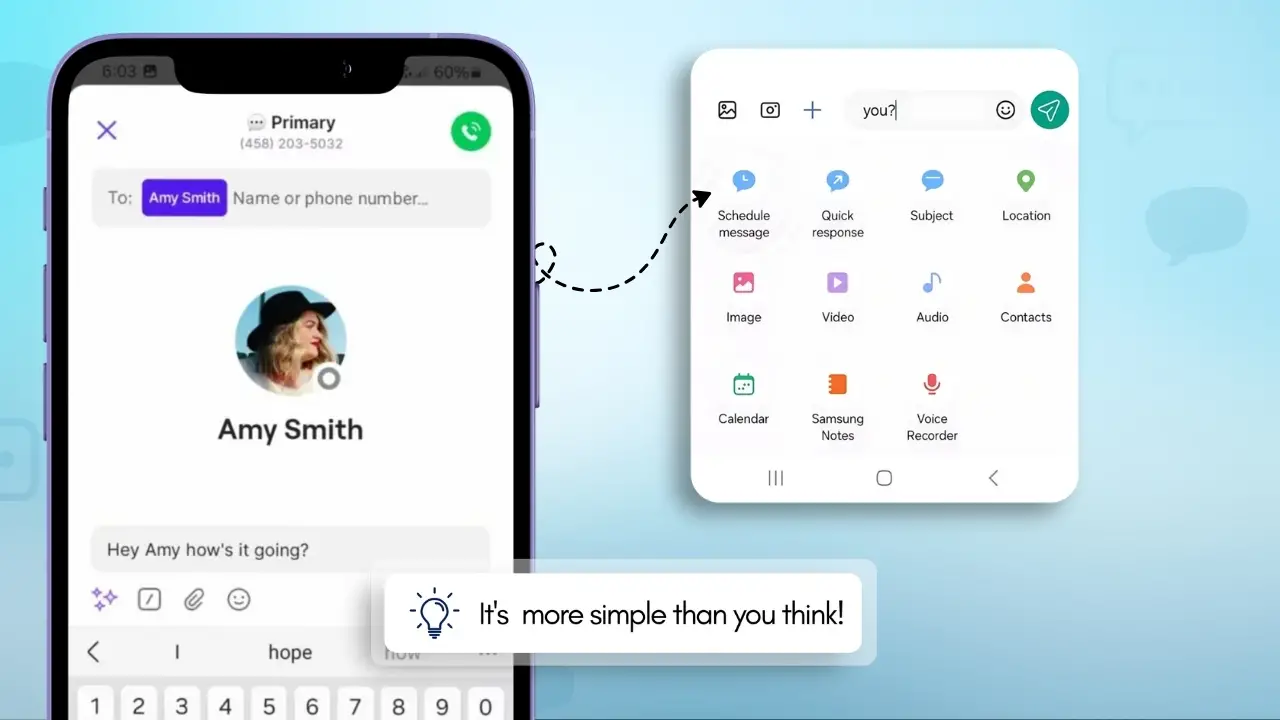
Sebbene Android non disponga di una funzionalità integrata per pianificare direttamente un messaggio di testo, puoi impostare promemoria per avvisarti quando è il momento di inviare un messaggio. Utilizzare l'app Google Calendar o Promemoria è un modo semplice per rimanere aggiornati e inviare messaggi al momento giusto.
Utilizzo di Google Calendar per pianificare promemoria di testo
Possiamo utilizzare in modo efficiente Google Calendar per pianificare promemoria per l'invio di messaggi di testo. Questo approccio è adatto a coloro che amano pianificare la propria comunicazione in anticipo.
- Passaggio 1: inizia avviando l'app Google Calendar.
- Passaggio 2: toccare l'opzione per creare un nuovo evento.
- Passaggio 3: scegli una data e un'ora adatte e inserisci il messaggio che desideri inviare.
- Passaggio 4: quando è il momento, apri il promemoria, copia il testo preparato e incollalo nell'app di messaggistica predefinita del telefono per inviarlo.
Come programmare un messaggio di testo con i dispositivi Samsung
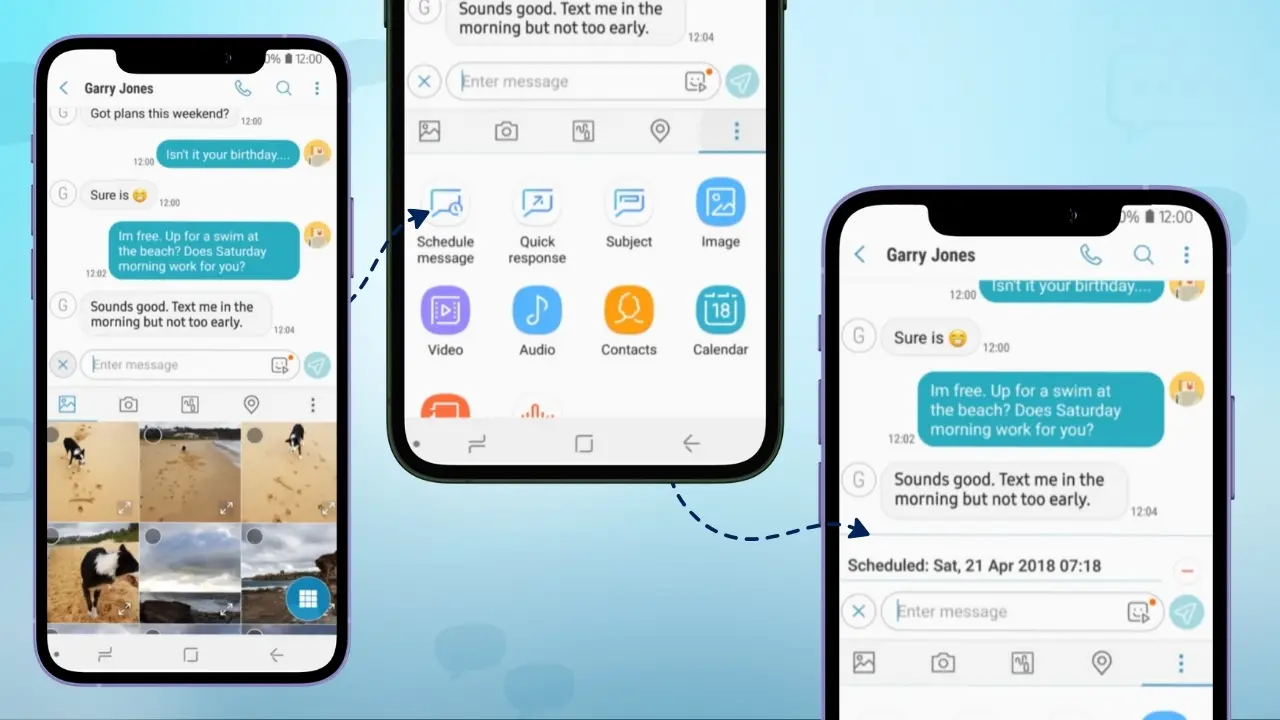
Pianificare i messaggi di testo sui dispositivi Samsung è semplice, grazie all'app Samsung Messaggi integrata. Ecco un dettaglio guida per programmare un testo messaggio:
- Apri Messaggi Samsung
- Inizia aprendo l'app Samsung Messaggi sul tuo dispositivo.
- Componi il tuo messaggio
- Digita il messaggio che desideri inviare e aggiungi il numero di contatto del destinatario.
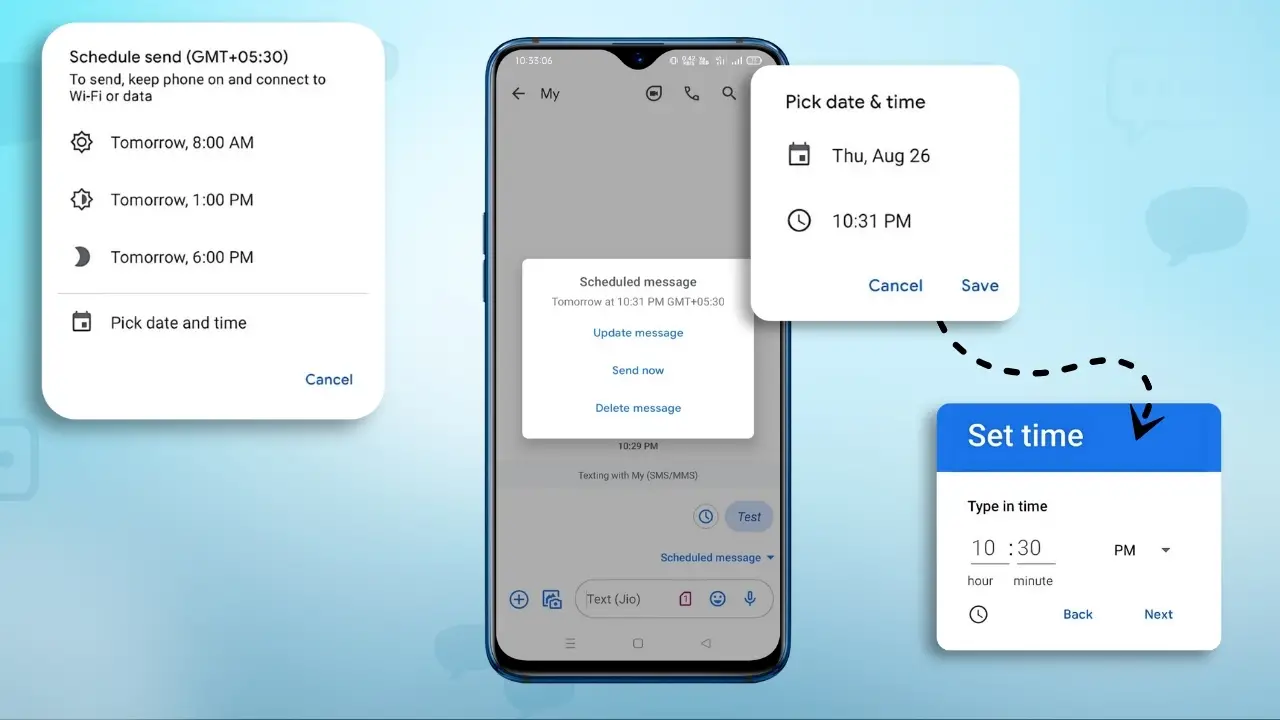
- Tocca l'icona "+".
- Invece di toccare la solita freccia di invio, cerca il file ‘+’ icona situata accanto ad essa. Si aprirà un menu di opzioni aggiuntive.
- Seleziona "Pianifica invio"
- Dal menu visualizzato, seleziona l'opzione "Pianifica invio". Ciò ti consentirà di impostare un orario specifico in cui verrà inviato il tuo messaggio.
- Imposta la data e l'ora
- Appariranno un calendario e un orologio che ti consentiranno di scegliere la data e l'ora desiderate per l'invio del messaggio. Scegli l'ora esatta che desideri.
- Salva il messaggio pianificato
- Dopo aver impostato l'ora, tocca "Salva" per confermare. Il tuo messaggio è ora programmato e verrà inviato automaticamente all'orario prescelto.
Una volta arrivata l'ora prevista, il tuo dispositivo Samsung invierà il messaggio senza che tu debba fare altro. È un modo semplice ed efficace per pianificare in anticipo l'invio di messaggi importanti.
Come programmare un messaggio di testo su altri telefoni Android
Per chi utilizza dispositivi Android diversi da Samsung, anche programmare gli SMS può essere semplice.
- Passaggio 1: consente di accedere all'app di messaggistica predefinita del telefono.
- Passaggio 2: inserire i dettagli del contatto.
- Passaggio 3: componi il tuo messaggio e tocca l'opzione "+".
- Passaggio 4: seleziona "Pianifica invio" dalle opzioni.
- Passaggio 5: scegli la data e l'ora preferite, quindi premi "Salva" per confermare.
Questa serie di istruzioni ci consente di mantenere la nostra comunicazione tempestiva e organizzata. Sia che si utilizzino promemoria di Google Calendar o funzionalità specifiche del dispositivo, la pianificazione dei messaggi di testo è uno strumento utile.
Come inviare un messaggio utilizzando un'app di terze parti
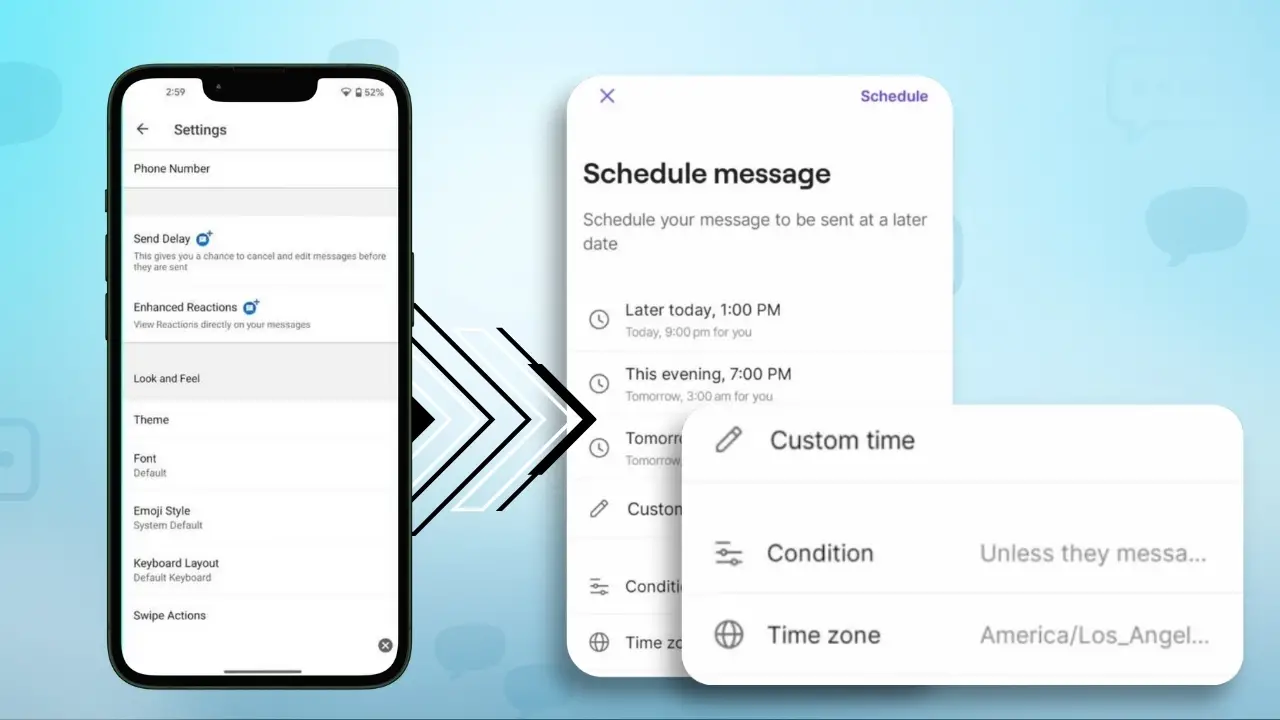
Per gli utenti Android che non dispongono di funzionalità di messaggistica programmata integrate, le app di terze parti forniscono una soluzione eccellente. Ecco come iniziare a programmare un SMS utilizzando app come Google Messaggi, Advance SMS o Auto Sender:
- Scarica e registrati per l'app
- Start by downloading the third-party app of your choice (such as Google Messages, Advance SMS, or Auto Sender) from the Google Play Store. Once installed, sign up or log in if necessary.
- Select the Recipient
- Choose the contact or contacts to whom you want to send the message. You can select from your phone’s contact list or manually enter a phone number.
- Componi il tuo messaggio
- Write the message you wish to send. Be sure to double-check the content and formatting before scheduling.
- Imposta la data e l'ora
- Once your message is ready, choose the option to schedule the message. Set the specific date and time when you want the message to be sent.
- Save and Confirm
- After setting the time, confirm your selection and save the scheduled message. The app will automatically send your message at the scheduled time.
Using third-party apps to schedule texts helps streamline communication, save time, and keep you organized, whether you’re managing personal or business messages.
How to Schedule a Text Message Using a Texting Software
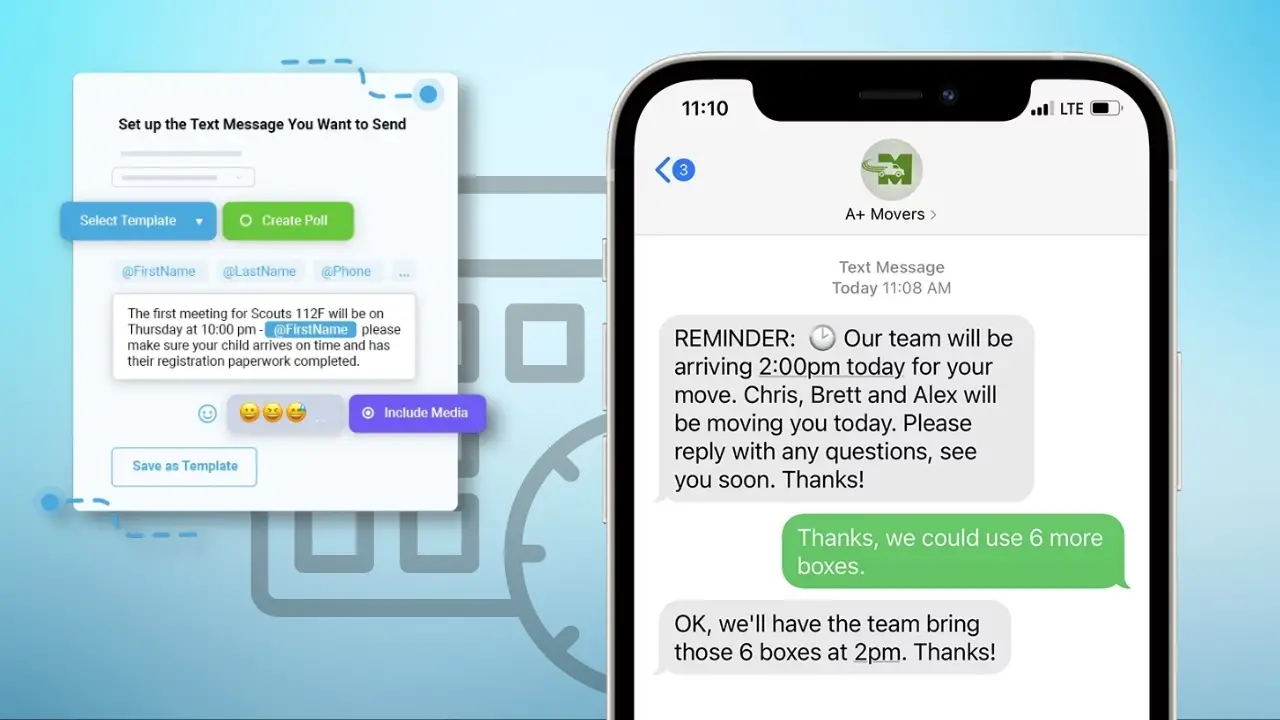
Schedule a messaggi di testo using texting software can greatly improve how we communicate with our audience. While it’s possible to do this on iOS and Android, it’s not the most efficient way, especially when messaging a large group.
Texting software like smslocal makes this process much smoother. Here’s a straightforward guide on how we can use such software:
- Select Recipients: Choose the people who will receive the message. This can be a specific group or a broader audience.
- Componi il tuo messaggio: Write the message we want to send. It could be a reminder, a notification, or part of a marketing campaign. Personalizing messages is also an option with texting software.
- Imposta la data e l'ora: Once our message is ready, we schedule it for a convenient time. This flexibility ensures our message reaches recipients when it’s most relevant.
- Automate with Triggers: We can set up our messages to automatically send when certain events occur. For example, reminders can be sent a day before an appointment, or promotions can go out at the start of a sale.
Texting software not only handles these tasks more efficiently than personal devices but also offers features that cater to specific business needs, like defining message frequency and personalizing each communication. Whether it’s for reminders, notifications, or marketing purposes, these tools allow us to communicate effectively and efficiently.
The convenience and time-saving aspects make texting software a valuable tool for businesses looking to enhance their communication strategies.
Scheduling a Message with SMSLocal
Step 1: Create an Account
- Visit the SMSLocal website and sign up by providing the required information.
- The registration process is quick and easy, allowing you to access all the platform’s features once completed.
- After signing up, you can import contacts, draft SMS messages, and schedule them for future delivery.
Step 2: Import Contacts
- Once your account is created, import your contacts by either manually adding them or uploading a contact list.
- Organize your contacts for easy selection when scheduling messages.
- SMSLocal allows you to categorize contacts, making it simple to send targeted messages to specific groups.
Step 3: Compose Your Message
- After importing your contacts, compose the message you want to send.
- You can write a custom message or use templates available on the platform.
Step 4: Schedule the Message
- Set the date and time you want the message to be sent.
- Review your message and contact selection before finalizing the schedule.
Step 5: Save and Confirm
- Once everything is set, save your scheduled message.
- SMSLocal will automatically send your message at the scheduled time, ensuring timely delivery.
What is the Best Method to Set Up Text Message Scheduling?
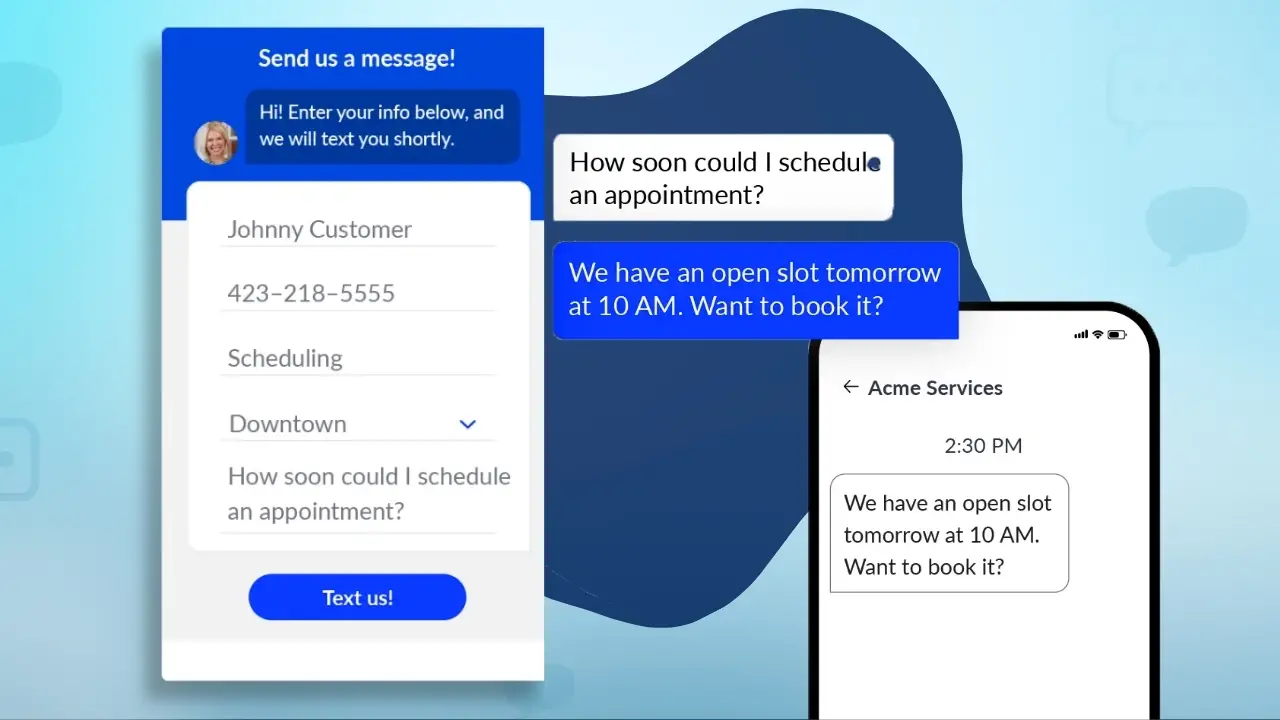
For businesses looking to schedule texts effectively, using a texting software is highly advantageous. This kind of software is designed to save time and boost engagement, making it a smart choice for business operations. We’ve found that this software provides several key features that can improve productivity and streamline communications.
Key Features of Texting Software:
- Message Scheduling: Plan and send texts at a later time that suits your needs.
- Follow-Up Frequency: Set the timing and regularity of follow-up messages to customers.
- Templates and Properties: Use a variety of templates, offering flexibility and customization.
- Attachments: Easily add images, videos, or documents to your messages.
- Signatures: Personalize your texts by adding custom signatures.
- Performance Metrics: Analyze how well your messages perform with built-in metrics tracking.
Tools like smslocal are excellent for managing various aspects of customer interactions. Whether you need to cancel or reschedule appointments, remind clients about upcoming meetings, request reviews, or manage payment follow-ups, texting software simplifies these tasks. You can sit back with confidence, knowing your messages are scheduled and will reach the intended audience on time.
Understanding these features lets us appreciate the multiple benefits of scheduling texts. This method significantly enhances our customer engagement strategy and ensures effective communication with our audience.
Importance of Planning When to Send Text Messages
Sending text messages at the right time is a powerful tool for both businesses and individuals. Here’s how scheduling messages can make a difference:
- Sharing Time-Sensitive DetailsScheduling messages is particularly useful for delivering time-sensitive information. For example, if you need to remind a patient to take their medicine at a specific time, you can schedule a message to go out at the right moment. This ensures the reminder is sent even if your workday ends earlier, and it helps the patient stay on track.
- Improved Customer Engagement for BusinessesFor businesses, planned messages can enhance communication with customers. By scheduling communications thoughtfully, you increase the likelihood of successful interactions. It also encourages more reviews from satisfied clients, helping to build your reputation and keep customers engaged.
- Maximizing EfficiencyScheduling text messages is an excellent way to manage your time. With busy schedules, it can be challenging to remember to send important messages at the right time. By planning ahead, you can write out your messages in advance and schedule them, ensuring they get sent without the risk of forgetting. This method helps keep you organized and efficient in your communication.
Practical Uses for Scheduled Text Messages
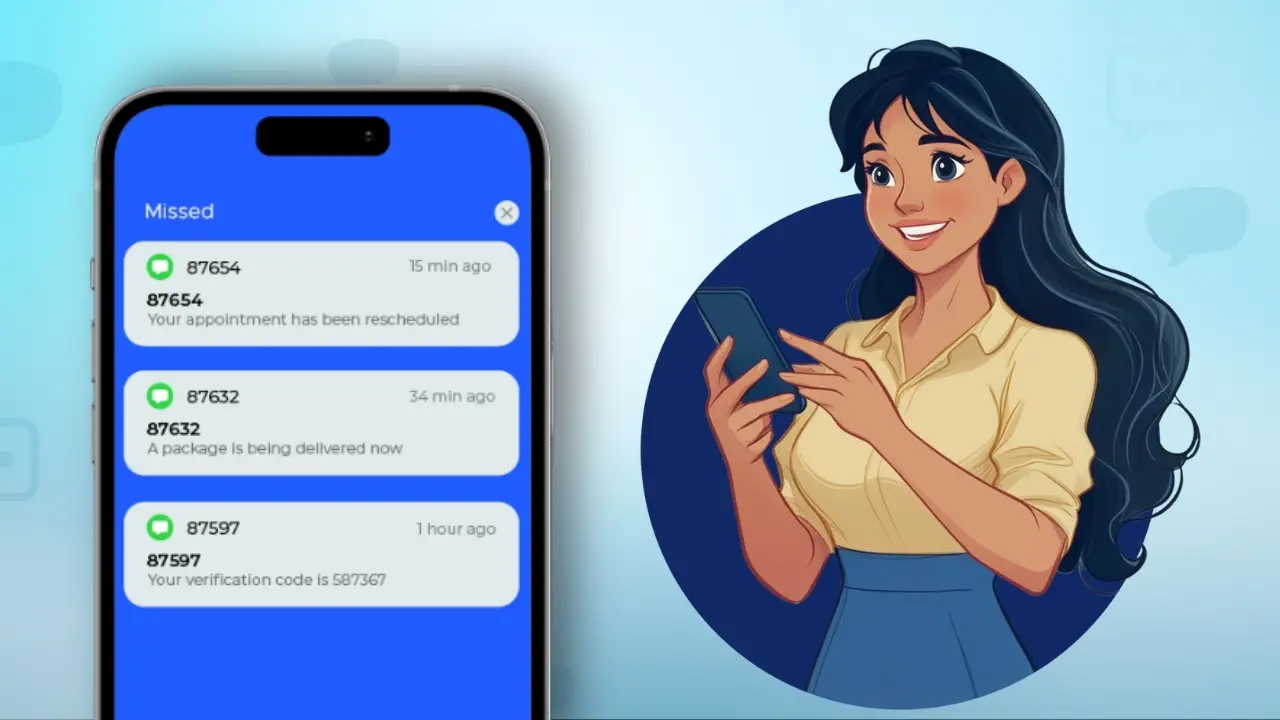
Scheduled text messages offer a wide range of applications that enhance how we connect and communicate with others. Here are some key ways they can be used effectively:
- Promemoria appuntamentiScheduled texts are perfect for sending appointment reminders, ensuring clients never miss a meeting. By setting these reminders in advance, you can keep your schedule organized and clients informed without manual effort.
- Payment ConfirmationsSending payment confirmations through scheduled texts helps keep your customers informed about their transactions. This can build trust and improve customer satisfaction by providing real-time updates on their purchases or payments.
- Marketing Campaigns and PromotionsFor businesses managing marketing efforts, scheduled messages are a valuable tool for launching campaigns and sharing promotions. This allows you to reach a large audience without overburdening resources, ensuring your message is sent at the most effective time.
- Updates and NotificationsImportant updates, such as new product releases or business changes, can be scheduled to reach both customers and team members at the right time. This helps keep everyone on the same page and avoids unnecessary disruptions during busy hours.
- Managing Time Zone DifferencesWhen dealing with international partners or customers, time zone differences can be a barrier. Scheduled texts help bridge this gap, ensuring your messages arrive at appropriate hours, which is especially useful for communicating across various time zones.
- Sending Warm GreetingsScheduled texts are also handy for sending timely greetings, such as birthday wishes or holiday messages, ensuring they are delivered right when they matter most.
- Feedback CollectionTo gather valuable insights, scheduling survey texts and review requests at optimal times can ensure higher response rates. This makes feedback collection more efficient, helping you make data-driven decisions.
- Follow-Up MessagesScheduling follow-up messages is a great way to maintain ongoing communication and engagement. These texts can be sent automatically to check in with your audience, reinforcing your relationship with customers or clients.
Overall, scheduled text messages provide a convenient, efficient way to manage various aspects of communication, from reminders to marketing and feedback, making it easier to stay connected and organized.
Conclusione
We hope this guide has helped answer your question on how to schedule a text message. For any business, ensuring customer satisfaction, addressing their concerns, and responding to their queries promptly is key to success.
Text messaging is a time-saving and cost-effective solution for achieving all of this. With SMSLocal’s easy-to-use features, you can enhance customer engagement and communication. schedule a text messages in advance, you can ensure timely and efficient communication with your customers, all while saving valuable time
Enhance your customer communication with SMSLocal and streamline your messaging process.
Domande frequenti
Yes, scheduling texts is possible on desktops, mobile phones, and both iPhone and Android devices. For more sophisticated options, like automatic replies or quick responses, one might consider using a text messaging tool such as smslocal, which offers these features.
To send messages at a specific time and date, particularly to multiple recipients, using SMS software such as smslocal is recommended. It enables features like message scheduling, batch texting, and personalization, making it suitable for managing large groups and tailored messaging.
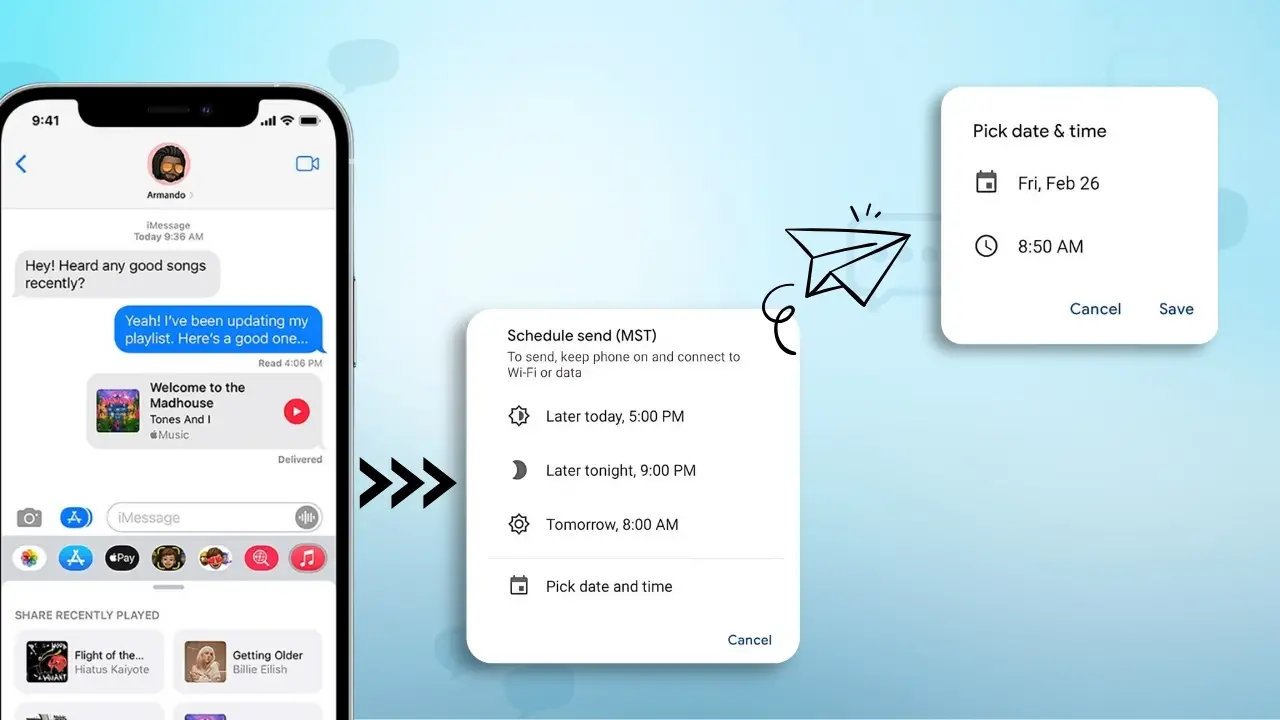
Yes, with iOS 16 and above, you can schedule send iMessages to send later. Simply compose your message, tap the “Send Later” option, choose the date and time, and your message will automatically be sent at the scheduled time.
The best time to schedule a text message depends on its purpose: • Personal messages: Send in the morning or evening when the recipient is likely to be free. • Business messages: Schedule during work hours, typically between 9 AM to 5 PM. • Marketing messages: Aim for peak customer engagement times, such as mid-morning or early afternoon.
You can schedule a variety of text messages, including: • Personal messages: Reminders, birthday greetings, or casual check-ins. • Business messages: Appointment reminders, follow-up messages, or customer service updates. • Marketing messages: Promotions, deals, and campaign announcements. • Important alerts: Reminders for deadlines, payments, or time-sensitive notifications.
Yes, you can schedule text messages on both iPhones and Android devices. iPhones have a native “Send Later” feature, while Android users can use built-in features or third-party apps to schedule their messages.
Yes, you can schedule a text messages on both iPhones and Android devices. iPhones have a native “Send Later” feature, while Android users can use built-in features or third-party apps to schedule their messages.